


Canara Bank Balance Check through SMS, Missed Call & Toll -Free
Want to know your Canara Bank account balance instantly? Whether you're at home or on the move, Canara Bank provides several easy and secure ways to check your balance in 2026, including through SMS, missed call, mobile banking, internet banking, and ATMs using your debit card.

In order to make banking more convenient, Canara Bank allows customers to check their account balance through simple services like SMS banking, missed call alerts, toll-free customer care, UPI apps, mobile banking, internet banking, and ATMs. Most of these methods require only your registered mobile number by which customers can check the balance details anytime without visiting a branch.
What are the Methods to Check Canara Bank Balance
Canara Bank Balance Enquiry | Number |
Check Through Toll-free | 1800-425-0018 or 1800-3011-3333 |
Canara Bank Account Balance Check via SMS | Send <CANBAL><space><your UserID><space><your MPIN> to 5607060 (or) 9015734734 |
Canara Bank Balance Check via Missed Call | 09015734734 (English) 09015613613 (Hindi) 8886610360 ( Alternative) |
Canara Bank Balance Check via WhatsApp | Send 'Hi' to 9076030001 |
Check Through USSD Code | *99*46# |
How to Check Canara Bank Balance?
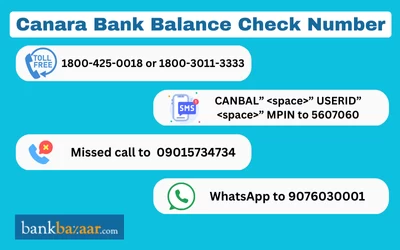
1) Canara Bank Balance Check Number Toll-free
- By calling the Canara Bank toll-free numbers, the account holders of Canara Bank can find out their balance.
- Only Indian clients can reach the following toll-free number:
✔️ 1800 1030
2) Canara Bank Balance Enquiry through SMS Banking
- Customers can use the Canara Bank balance check number to text their account balance to 5607060.
- The user must send a text using the format specified below:
✔️<CANBAL><space><your UserID><space><your MPIN> from the registered mobile number.
- You can also check your account balance instantly by sending an SMS from your registered mobile number to 9015734734.
3) Canara Bank Missed Call Balance Enquiry Number
In order to check your account balance through missed call banking, you need to give a missed call to 8886610360 from your registered mobile number that is linked with Canara Bank. After that, the call will be disconnected automatically. You will receive an SMS with your latest account balance details. If you do not call with your registered mobile number, then you will not be able to receive the balance information. This service is free of cost and available 24/7 for customer convenience.
4) Canara Bank Balance Enquiry through Internet Banking
Customers of Canara Bank can view their account balance via the online banking interface. To check their bank balance via online banking, customers must do the following actions:
Step 1: Visit the Canara Bank online banking page.
Step 2: Enter the user ID and password to access the online banking portal.
Step 3: Click on "View Account Details" after logging in.
Step 4: Choose the option "Check Account Balance."
Step 5: The Canara Bank account's current balance will be shown on the screen.
5) Canara Bank Balance Enquiry through Mobile Banking
Through the Canara Bank Mobile Banking application, customers can check the balance on their Canara Bank accounts. The ways to check your Canara Bank balance via mobile banking are listed below:
Step 1: Get the Canara mobile banking app on the iOS or Play store.
Step 2: Launch the app, then sign in with your MPIN or registered mobile number.
Step 3: Navigate to the 'My Accounts' settings after logging in.
Step 4: Then select "View Account Balance." The Canara Bank account's current balance will be shown on the screen.
6) Canara Bank Balance Enquiry through ATM
Using an ATM, either one owned by Canara Bank or one owned by another bank, is an additional way to find out the balance of your Canara Bank account. Clients can use an ATM to check the balance on their Canara Bank account by doing the following steps:
Step 1: Visit the ATM at Canara Bank. Insert the ATM card from Canara Bank in.
Step 2: Insert your debit card into the ATM.
Step 2: Enter the ATM's four-digit PIN.
Step 3: Click on option the ‘Balance Enquiry’.
Step 4: The screen of the ATM will show the current balance of your Canara Bank account.
8) Canara Bank Balance Check through WhatsApp
By following the steps given below, you can check your account balance through WhatsApp as well.
Step 1: Open your contacts and save the number +91 9076030001.
Step 2: Open WhatsApp and send ‘Hi’ to the saved number.
Step 3: From the options, select the ‘Banking Service’.
Step 4: Select the option ‘Balance Enquiry’.
Step 5: You will get an OTP on your registered mobile number.
Step 6: Enter the OTP and select the account to check.
Step 7: Your balance will be sent to you as a message by the chatbot.
9) Canara Bank Balance Check through UPI
Here are the simple steps by which customers can check the balance via any UPI app.
Step 1: Open any UPI app like Google Pay, PhonePe, Paytm, or BHIM on your mobile. Step 2: Log in using your UPI PIN or app lock. Step 3: Tap on the “Check Balance” or “Bank Balance” option. Step 4: Select your Canara Bank account linked to the UPI. Step 5: Enter your UPI PIN in the application. Step 6: Your account balance will be displayed on the screen instantly.
10) Canara Bank Balance Check via USSD Code
Dial *99# from your registered mobile number to access Canara Bank USSD services. Select Check Balance and choose Canara Bank.Enter your UPI PIN to view your account balance instantly.
Be Money-Smart with our App



FAQs on How to Check Canara Bank Balance
- How can I view the last five transactions made with Canara Bank?
There are several ways to view your last five transactions in Canara Bank: via an ATM, online banking, a missed call, or a USSD code.
- What is the missed call number for Canara Bank balance enquiry?
You can give a missed call to 8886610360 from your registered mobile number to get your account balance details.
- How can I use a missed call to check the balance on my Canara Bank account?
You must place a missed call to the Canara Bank Missed Call number in order to inquire about the balance if you wish to check your Canara Bank balance through missed calls. You can use your registered mobile phone to dial 09015734734.
- Is it necessary to use my registered mobile number?
Yes, you must use your registered mobile number with your bank account to access balance enquiry services.
- Do I need internet access to check my balance?
No, internet access is not required for missed call banking, SMS banking, or toll-free services. However, the internet is needed for mobile banking, UPI, and net banking.

Karishma VP has over a decade of experience in content writing which includes over five years specializing in personal finance. Her career in BankBazaar has given her the opportunity to write on a wide variety of financial products ranging from credit cards and home loans to insurance policies and government schemes. She believes that an understanding of personal finance is an important step to leading an independent, empowered life. This has led to her being passionate about learning more about the BFSI sector and writing about personal finance as clearly, concisely, and accurately as possible to make it accessible to a larger audience through BankBazaar.

Disclaimer
Credit Card:
Credit Score:
Personal Loan:
Home Loan:
Fixed Deposit:


Copyright © 2026 BankBazaar.com.