


Visa Entitlement Verification Online (VEVO)
VEVO is an online service provided by the Australian Government to check visa details. VEVO is commonly used to confirm a person’s legal status in Australia. This facility provide access to records of people who have applied for an Australian visa since 1990, as stored in the government’s electronic database.

What is Visa Entitlement Verification Online (VEVO)?
Visa entitlement verification online (VEVO) is a free facility provided by the Department of Immigration and Border Protection, Government of Australia, to help visa holders check details of their visas online without any hassles.It shows information like your visa type, conditions, and expiry date.
Information Required for Accessing VEVO
In order to check your visa details with the help of VEVO, you need to know some key information from your visa application. These are as follows:
- Transaction Reference Number: This is a unique number that is given to you when you apply for a visa online. This number is required by the system to locate your application and verify your identity easily.
- Visa Grant Number: This number is provided to you when your visa is approved. It is used to access your visa details and confirm your visa status in the VEVO system.
How to Check the Visa Status with VEVO Website?
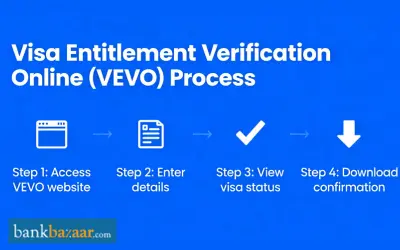
By following the simple steps given below, you can easily check your visa information online:
Step 1: Visit the official website of Check visa details only (VEVO).
Step 2: Select the option to ‘Check Visa Details’.
Step 3: Fill in all the details accurately.
Step 4: Submit the form to see your visa status and details.
How to Check the Visa Status Using the VEVO App?
Mentioned below are the steps by which you can check your visa status by using the VEVO app:
Step 1: Download the myVEVO app from the Play Store or App Store.
Step 2: Open the app and generate a secure PIN, set up a Touch ID or Face ID to check your visa details quickly.
Step 3: Fill in your personal details such as visa grant number or transaction reference number, and date of birth.
Step 4: Enter your travel document details.
Step 5: Review the details and accept the ‘Terms and Conditions’.
Step 6: Submit the information to check your visa details.
How to Email Visa Details from VEVO?
You can also share your visa details via email to employers and other organisations. Here are the steps given below:
Step 1: Go to the official website of VEVO and access your details.
Step 2: Select the option ‘Send Email’ to open the email screen.
Step 3: Enter the recipient’s email address to whom you want to send the email.
Step 4: Enter your own email address.
Step 5: Check all the details carefully to protect your personal information.
Step 6: Click on the option ‘Send Email’ and you will get a confirmation e-mail.
Details Provided by VEVO
As a visa holder, you can make use of the VEVO facility to check the status of your visa. What's more, a mobile app - myvevo, is also available which can be downloaded on your smartphone (Android or ios) for ready use. Upon entering your passport number and grant number, you can check your visa type, travel conditions, work rights, expiry date, and validity and study rights among others. To use the myvevo app effectively, you need details such as your date of birth, visa Grant Number and Passport details.
The details provided by VEVO include the following:
- Visa description
- Visa Status
- Visa Expiry Date
- Family Name
- Visa grant Number
- Visa grant date
- Visa class/sub-class
- Entry date (must enter before date)
- Expiry date
- Entries allowed
- Period of stay
- Visa type
- Names of dependents
Registered Organizations with VEVO
Third parties can also check Australian visas for verification purposes. Visa holders do not need any registration to use the VEVO app. However, organizations must register by creating an ImmiAccount and having a valid Australian Business Number (ABN) to use the services.
Organizations use VEVO to confirm whether a person is allowed to work or not for a specific activity in Australia. VEVO does not provide full personal details, and it only shows information that is available in electronic records. The types of organizations which needs to register for VEVO are as follows:
- Registered Migration Agents (RMAs)
- Real estate agents
- Education providers
- Employers
- Financial institutions
- Telecommunication companies
- Labour suppliers
- Government agencies
- Sharing economy organisations
You can provide your visa entitlement details to organizations by sending them an email from VEVO (login to VEVO to check entitlements) following which, you can print a PDF copy.
Common VEVO-Related Questions
In case you have some queries regarding the use of VEVO, you can fill out the VEVO enquiry form and send it to the concerned department.
FAQs
- Is the Vevo app free to use?
Yes, you can download the myVEVO app for free of cost from the App Store or Play Store.
- Which government provides the VEVO facility?
The Australian Government is the only one that has developed the VEVO process. However, other countries, like as Singapore, Vietnam, Turkey, Cambodia, Sri Lanka, Myanmar, India and so on, are likely to develop VEVO for the citizens soon.
- Can I use VEVO to check a pending application?
No, you can only check your granted visa details through VEVO.
- Who can use VEVO?
The tool can be used by visa holders, employers, education providers, and various organisations.
- What do I need to check my status online?
You will require your passport number and a reference number (like a Grant Number or Application ID) to see your visa details online.

Disclaimer
Credit Card:
Credit Score:
Personal Loan:
Home Loan:
Fixed Deposit:


Copyright © 2026 BankBazaar.com.